
| Minimum Software Version | 10.9.0 |
| Solution(s) | Hearings ⨉ Cases International ✓ Cases US ✓ Institutions ✓ Counsel ✓ Focused View✓ |
Opus 2 AI Usage dashboard gives system administrators visibility into AI token consumption across the platform. Metrics are presented in a clear, easy-to-understand format and are accessible from the System Admin area.
As AI capabilities become an integral part of the Opus 2 platform, understanding how tokens are consumed helps administrators manage resources responsibly and plan effectively. The AI Usage dashboard feature aggregates usage data at the server level, giving system administrators a single place to review current-cycle consumption, monthly trends, and remaining allowances — without needing to navigate across individual projects.
Accessing the usage dashboard
- Click the system cog icon to open the System Admin page.

- Navigate to the AI Usage tab near the top of the page.

The AI Usage dashboard will be displayed.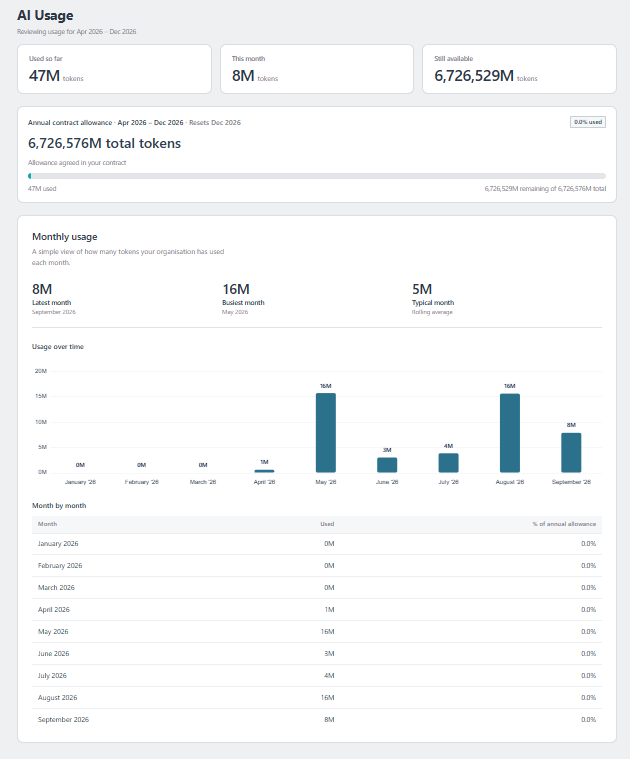
Items displayed in the AI usage dashboard
The dashboard contains the following metrics:
| Metric | Description |
|---|---|
| Usage so far | The number of tokens consumed since Focused View was enabled. For a 12‑month contract where Focused View was enabled four months after the contract start date, the token allowance will be prorated accordingly. |
| This month | Token usage recorded during the current calendar month. |
| Still available | Remaining tokens available within the current cycle. |
| Annual contract allowance | A progress bar showing total token usage against the contract year allowance. The allowance refreshes every 12 months. If a client has a 3-year contract, the token allowance refreshes at the start of every contract year. |
| Monthly usage | A breakdown of monthly token usage, including the latest month, busiest month, and typical monthly usage. Also displays a bar chart of usage over time and a month-by-month table showing usage volume and each month's percentage of total usage. |
Review the AI Usage dashboard regularly in the System Admin area to manage resources effectively and maintain transparency around platform AI usage.
Related links
Related documentation
Opus 2 has help information accessible within the application; click the question mark and then select Documentation in the upper-right area of the platform application. You can also access the documentation at: Opus 2 Support.
How to contact us
To contact us about the documentation, or if you have any other questions or issues about Opus 2 solutions, contact Opus 2 Platform Support by emailing Opus 2 Platform Support.