
| Minimum Software Version | 8.15.0 |
| Solution(s) | Hearings ⨉ Cases International ✓ Cases US ✓ Institutions ⨉ Counsel ⨉ |
Relativity is a review platform that is used to handle the triage and classification of large volumes of documents often resulting from an e-discovery exercise. Typically, only a small subset of these are needed for conducting the case. The Opus 2 Relativity integration is designed to allow a user to easily import that subset into the Opus 2 Platform. Often the case management work may start before the review stage is complete, so the connector also allows content in the Platform to be updated from Relativity after the initial import.
The Relativity integration allows for native documents, original images, production files, and associated metadata to be imported into a project. Appropriate folders and associated metadata need to be configured in the connected project before transferring files.
The ability to integrate Relativity with a project is an optional, operator controlled feature. It has been developed specifically for the Opus 2 Case Management solution, but can be made available for any template or solution if desired.
Enabling Relativity integration in a project
Before an integration with Relativity can be set up:
- The feature must be enabled within your template, as well as the desired project(s) by Opus 2 Platform Support.
- The Relativity instance must meet several System Requirements to create a successful connection (learn more: Relativity Integration: Setting up a new connection).
Relativity Connector & REST API
Opus 2 supports Relativity through the use of Relativity’s REST API architecture. Using Relativity’s RESTful conventions, the REST API passes requests to the Services API, which communicates with the Relativity business engine. The REST API uses named pipes for fast, in-memory communication, minimizing latency in calls between the two services.
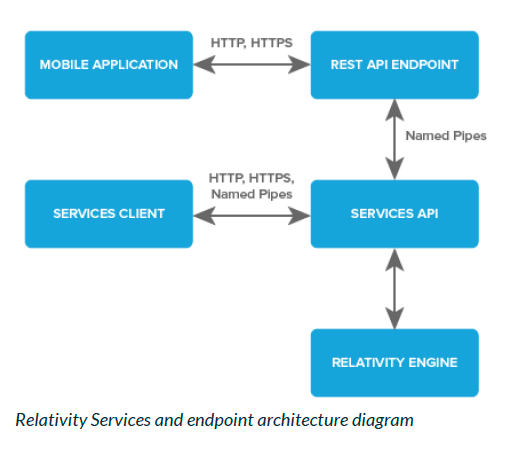 Diagram 1 - The Relativity Services and Endpoint Architecture, showing how the REST API interacts with the Services API.
Related articles
Relativity Integration: Setting up a new connection
Related documentation
Opus 2 has help information accessible within the application; click the question mark and then select Documentation in the upper-right area of the platform. You can also access the documentation at: Opus 2 Support.
How to contact us
To contact us about the documentation, or if you have any other questions or issues about Opus 2 solutions, contact Opus 2 Platform Support by emailing Opus 2 Platform Support.