
| Minimum Software Version | 9.58.3 |
| Solution(s) | Hearings ⨉ Cases International ✓ Cases US ✓ Institutions ⨉ Counsel ✓ |
New Features
Transcript tab for case navigation (US Clients Only)
A dedicated Transcript tab is being introduced within case navigation, providing quicker access to transcript content directly from a case.
Initial release introduces the Transcript tab entry point within case navigation, establishing the foundation for transcript-specific workflows with additional functionality designed to improve transcript management and review.
Current capabilities include:
- A dedicated Transcript tab within case navigation
- A document actions menu for transcript items
- Live updates for document status changes
- Folder-level filtering
- Accurate document counts within folders
- Support for transcript-focused workflows within transcript-enabled projects
In addition, the transcript viewer now includes an Import… option for supported worksheet types. When viewing worksheets that contain transcript text, users can launch an import dialogue directly from the transcript viewer to import additional transcript content. The option is displayed only when applicable to the selected worksheet.
Stamp templates can now be exported and imported between projects
Users with Manage Stamps permissions can now export stamp templates from one project and import them into another.
Previously, stamp configurations had to be recreated manually for each project. This enhancement allows teams to reuse existing stamp templates, helping maintain consistency across matters while reducing administrative effort.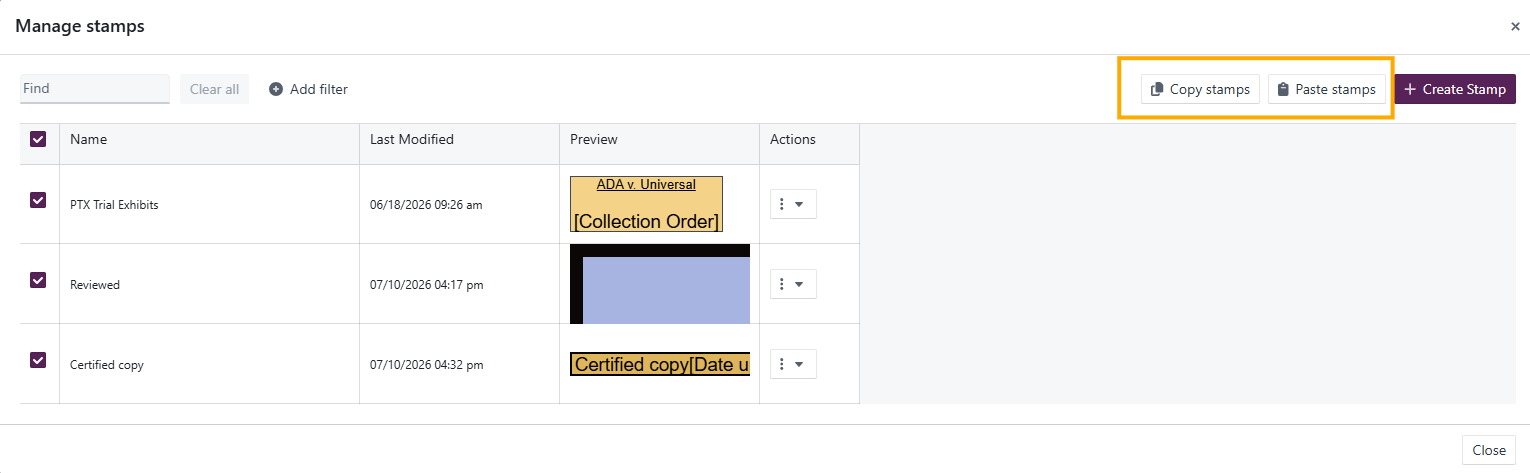
This is particularly useful for organisations that use standardised stamping formats across multiple projects.
Search performance and highlighting improvements (European Early Access)
Search now returns results faster and highlights matching content more accurately for participating European users.
Previously, retrieval speed and hit highlighting could be inconsistent, making it more difficult to quickly locate relevant information. These improvements help users find information more efficiently and make matching content easier to identify within search results.
This enhancement is currently available only to select APAC and European members and will be rolled out more broadly in a future release.
Bug Fixes
Admin Users table scrolling now remains aligned with column headers
Scrolling within the Users table in System Admin now keeps table content correctly aligned with column headers.
Previously, scrolling while the cursor was positioned over the image or name columns could cause row content to become misaligned with the header row. All columns now remain synchronised regardless of cursor position.
Large project archive exports are now more reliable
Several improvements have been made to the project archive process to improve the reliability of large archive exports.
Previously, archive jobs larger than 2 GB could occasionally fail during the final upload stage after spending significant time gathering and packaging project data.
Enhancements include:
- Improved routing for S3 uploads
- Automatic retry handling for transient upload failures
- Increased temporary storage allocation for large archives
- Detection and recovery mechanisms for stalled archive jobs
These changes improve the reliability of archive exports for large projects.
Portal schemas no longer appear as worksheet destinations
An issue affecting the Add to worksheet workflow has been resolved.
Previously, portal schemas and their child schemas could incorrectly appear in the destination list when adding documents to a worksheet. Only valid worksheet schemas are now displayed as available destinations.
Upcoming features
Search Improvements (Upcoming for North American Clients)
Search is being enhanced to deliver faster, more accurate results for North American clients. Improvements include clearer, more consistent highlighting of matching content, making it easier to identify relevant information within search results.
In addition, enhanced monitoring capabilities will help detect and resolve search-related issues more quickly, supporting a more reliable search experience.
These improvements are planned for an upcoming release and will be available to North American clients as part of the rollout.
Selective Export of Collection Items
Users will be able to export specific items from a collection without exporting the collection in its entirety, providing greater flexibility when preparing document sets for review or sharing. The feature is currently behind a feature flag with initial support for ZIP-based exports; additional export options are planned.
Related documentation
Opus 2 has help information accessible from within the application; accessible by clicking the question mark and then selecting Documentation in the upper right area of the platform application. You can also access the documentation at: Opus 2 Support.
How to contact us
To contact us about the documentation, or if you have any other questions or issues about Opus 2 solutions, contact Opus 2 Platform Support by emailing Opus 2 Platform Support.