
| Minimum Software Version | 8.14.3 |
| Solution(s) | Hearings ⨉ Cases International ✓ Cases US ✓ Institutions ✓ Counsel ✓ Focused View⨉ |
Explains how to use AI Analysis on a single document or transcript, including the entity types that can be extracted and how to add results to worksheets.
Single document analysis enables real-time AI analysis on individual documents or transcripts. Users can extract key entities, query documents for specific information, obtain summaries, view contextual evidence for AI results, and add extracted information directly to worksheets.
What can be analysed
The following entities can be analysed and extracted from a document:
- Key points
- Organisations
- People
- Events
Note: Extracted entities can be added to worksheets such as Characters or Chronology from the Document Viewer. Alternatively, from the document preview on the Documents page, select entities using the checkboxes and then select Actions > Add to [worksheet].
Key points
Selecting Key Points displays a numbered list of key summary points for the document. AI Analysis attempts to return around ten items; the precise number depends on the length and complexity of the text.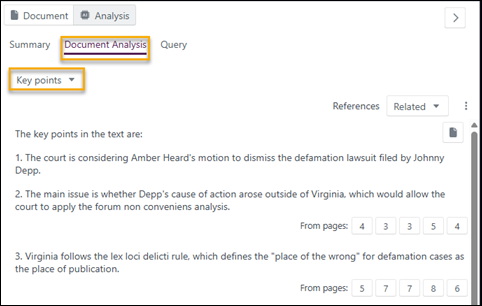
The References dropdown can be used to hide the source information at the bottom of each section or to display different types of citations, showing the relevant pages from which the information is retrieved.
For more information on references and percentage relevance, see AI Analysis: Document summary.
Organisations
Selecting Organisations analyses the document for companies and organisations mentioned in the text. AI Analysis attempts to extract the following information about each organisation: name and a brief description. If not all information is available, the organisation is still extracted with some fields left blank.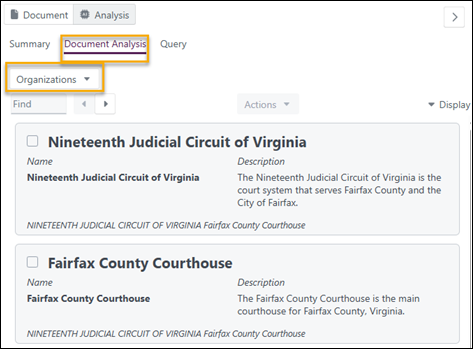
People
Selecting People analyses the document for specific individuals. AI Analysis attempts to extract the following information, depending on what is available in the document: first name, last name, associated organisation, job title, description, role in the case, and address. If not all information is available, the person is still extracted with some fields left blank.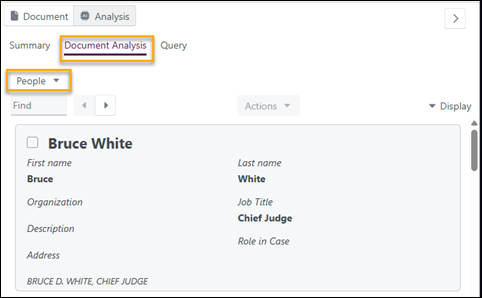
Events
Selecting Events analyses the document for specific events. AI Analysis attempts to extract the following information, depending on what is available in the document: date, event summary, location, participant names, and a description of what took place. If not all information is available, the event is still extracted with some fields left blank.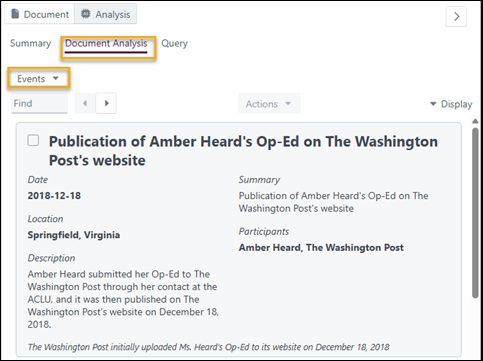
Related links
Related documentation
Opus 2 has help information accessible within the application; click the question mark and then select Documentation in the upper-right area of the platform. You can also access the documentation at: Opus 2 Support.
How to contact us
To contact us about the documentation, or if you have any other questions or issues about Opus 2 solutions, contact Opus 2 Platform Support by emailing Opus 2 Platform Support.