
| Minimum Software Version | 8.16.0 |
| Solution(s) | Hearings ⨉ Cases International ✓ Cases US ✓ Institutions ⨉ Counsel ✓ |
When using Single Document Analysis, the order in which information is added to worksheets can affect your efficiency and speed of working. The recommended order is: Organisations (US), Characters, then Events. This enables the building of a Chronology to be easier and more efficient. By creating Organisations (US) first and then People/Characters, you set up the main entities that events can later link to. When events are added to the Chronology, you can link the existing entries instead of having to go back and create them.
Step 1: Run Single Document Analysis
- Select the Document/Transcript.
- Select the Analysis tab in the Details panel to run the analysis.
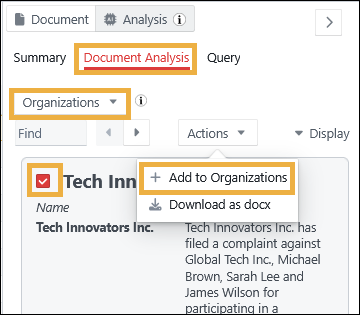
Step 2: Add Organisations
- Select the Document Analysis tab.
- Select Organizations from the dropdown.
- Select your chosen organisations to be added to the worksheet.
- In the Actions dropdown, select +Add to Organizations.
Step 3: Add relevant People
- Select People from the dropdown.
- Select your chosen people to be added to the worksheet.
- In the Actions dropdown, select +Add to Characters.
You can now link those characters to the associated organisations using the Characters worksheet.
Step 4: Add Events
- Select Events from the dropdown.
- Select your chosen people to be added to the worksheet.
- In the Actions dropdown, select +Add to Chronology.
You can now link those events to the associated characters and organisations using the Chronology worksheet.
Related articles