
| Minimum Software Version | v10.6.3 | Date: August 2026 31 |
| Solution(s) | Hearings ⨉ Cases International ✓ Cases US ✓ Institutions ✓ Counsel ✓ Focused View⨉ |
New release
There are no new features in this release.
Improvements
This release includes several enhancements to Cases, Focused View, and shared UI components.
Cases
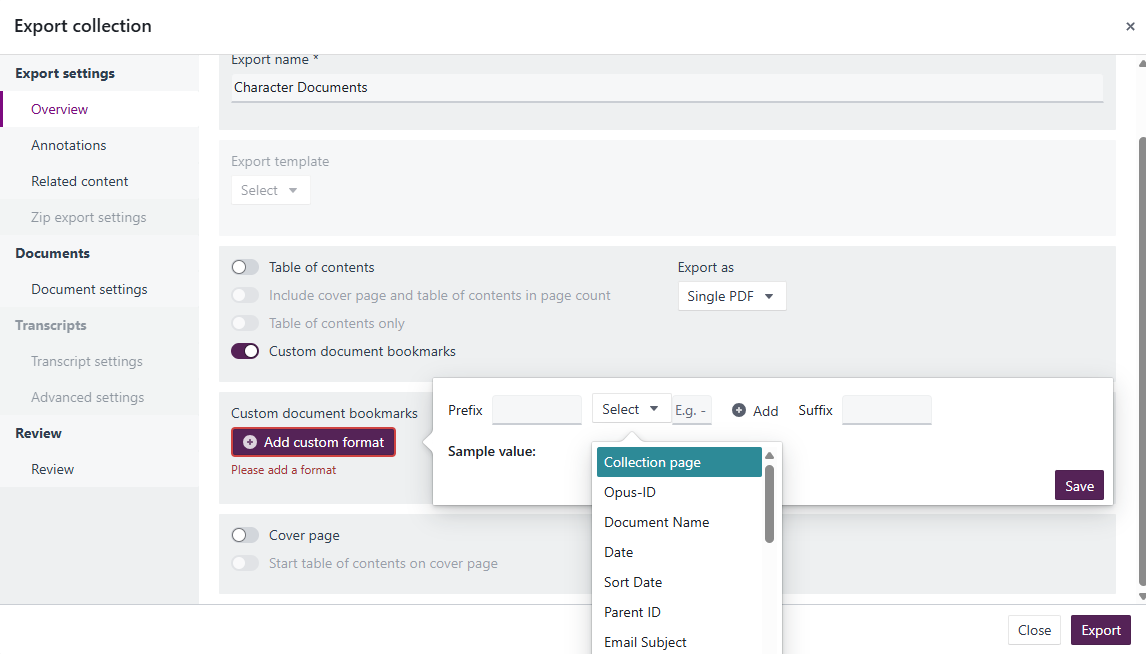
- Export bookmark label updated: The bookmark option in the export dialog has been renamed from "Page" to "Collection page" to more accurately reflect what it represents.
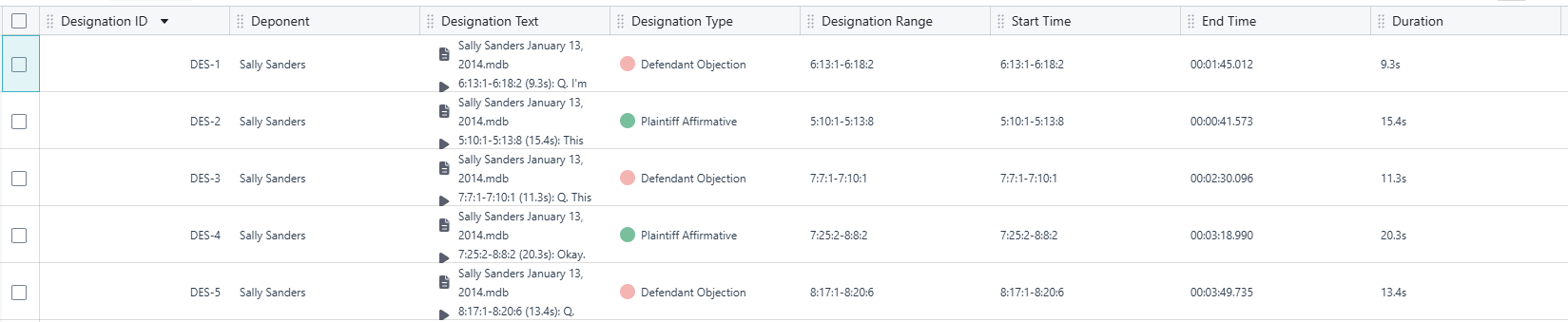
- Video start and end time fields in DOCX and PDF exports: When exporting designations to Word or PDF format, the exported document now includes video start and end time fields, providing a complete time reference. For instructions on how to use this feature, see Adding start time, end time and duration fields to designations.
Customer-reported fixes
The following issues, reported by customers, have been resolved in this release.
- [CS3-401] ICP worksheets now fully included in exported data: Some ICP worksheet rows were previously missing from bulk data exports. The export query has been corrected to include all worksheet entries.
- [CS3-92] Exported video clips now play at the correct speed: Clips exported from cases were playing back faster than the original recording. Duration metadata is now set correctly on export.
- [CS3-101] Transcript date field no longer clears when typed manually: Manually typing a date in the transcript upload dialogue previously caused the field to clear unexpectedly. The field now retains the typed value.
- [CAS-564] Stamps now correctly placed and oriented on single-PDF exports: Stamps were being misplaced or incorrectly rotated when a bundle was exported as a single PDF. The placement and rotation logic has been corrected.
Bug fixes
There are no new bug fixes in this release.
Upcoming release
The following features are in progress and expected in a future release.
- Search improvements (North American clients): Search is being enhanced to deliver faster, more accurate results. Planned improvements include clearer, more consistent highlighting of matching content to make it easier to identify relevant information within results. Enhanced monitoring capabilities are also expected to help detect and resolve search-related issues more quickly.
This enhancement is currently available to a limited group of North American clients and will be rolled out more broadly in a future release.
Related documentation
Opus 2 has help information accessible from within the application; accessible by clicking the question mark and then selecting Documentation in the upper right area of the platform application. You can also access the documentation at: Opus 2 Support.
How to contact us
To contact us about the documentation, or if you have any other questions or issues about Opus 2 solutions, contact Opus 2 Platform Support by emailing Opus 2 Platform Support.