
| Minimum Software Version | 9.42.1 |
| Solution(s) | Hearings ⨉ Cases International ✓Cases US✓ Institutions ⨉ Counsel ✓Uncover✓ |
Focused View Enhancements
Unified AI Assist
Focused View now provides a single AI assistant that handles both matter-wide questions and document-specific analysis, eliminating the need to choose between Matter Assist and Document Assist before each interaction. Simply submit your prompt as normal—if documents are selected, the assistant will include them in its analysis; if not, it will respond using context from the matter as a whole.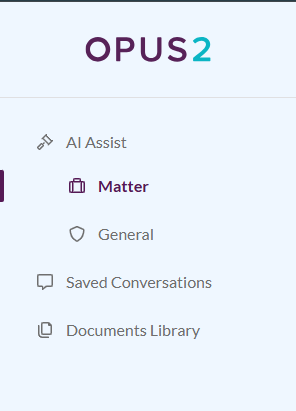
Shared Conversations
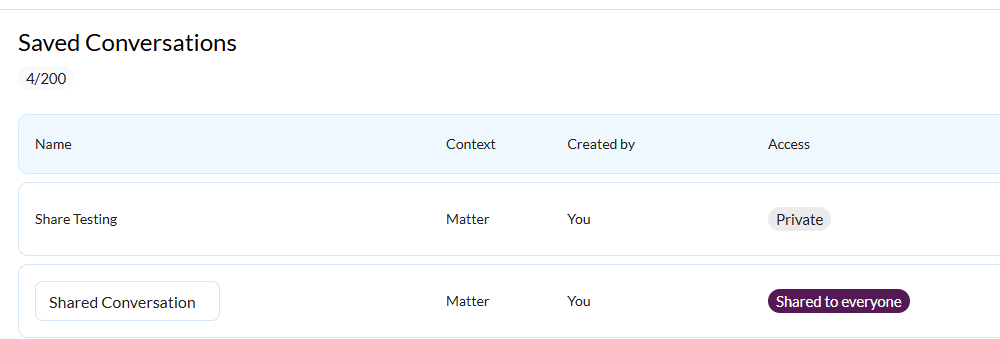
You can now share saved Focused View conversations with colleagues who have access to the same matter. Conversations can be marked as Private to keep them visible only to you or Shared to make them available to your team, making it easier to collaborate, build on previous AI interactions, and reduce duplicated effort.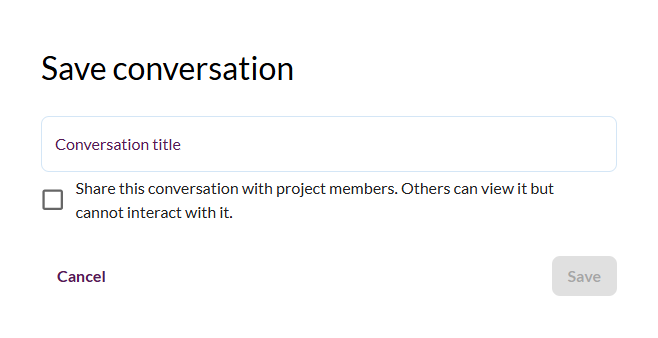
To learn more about these Focused View enhancements, including conversation sharing and Unified AI Assist, please review our FAQs.
Upcoming features
Customisable Table of Contents for Bundles (collections)️ - Preview release
We are introducing a new Table of Contents editor designed to give you greater flexibility in creating court-compliant indexes across key jurisdictions. The updated experience will be more intuitive and easier to use, with real-time preview capabilities. You will be able to set up a table of contents with flexible formatting and layout options, including font type, font size, headings, and section headings, a choice of unified or section-level tables, and control over column layout and visibility.
Stamps - Preview release
Based on customer feedback, we are investing in a new, modernised Stamps experience to provide an improved way to create, manage, and export stamps. The new Stamps feature will introduce, among other things:
- A more flexible and intuitive stamp builder, enabling you to create and customise stamps with concatenated fields easily, and helping you to design consistent, tailored stamps.
- Real-time preview to make stamp setup clearer and more predictable.
- Consistent stamp application and removal across documents, collections, and proxy documents, including the ability to remove a specific stamp, not just “remove all”.
- Metadata fields remain supported (as in Legacy Stamps), with more focused styling controls to prioritise consistent output between the platform and exports.
- Enhanced Stamp controls with the ability to adjust and rotate stamps on individual pages, giving the user precise control over how stamps appear throughout a document.
Search
We're improving our Search functionality to deliver faster, more accurate, and more reliable results.
These updates seek to:
- Return results more quickly and with greater accuracy.
- Provide clearer, more consistent highlighting so results are easier to understand and trust.
- Enable us to detect and resolve issues earlier through improved monitoring.
AI for Hearings
Opus 2 is aiming to deliver real-time inconsistency checking on live transcriptions in multi-party hearings. In this setting, a workspace contains all the documents compiled by a case team, and the objective is to use this knowledge base to generate real-time insights from the live transcription.
Related documentation
Opus 2 has help information accessible from within the application; accessible by clicking the question mark and then selecting Documentation in the upper right area of the platform application. You can also access the documentation at: Opus 2 Support.
How to contact us
To contact us about the documentation, or if you have any other questions or issues about Opus 2 solutions, contact Opus 2 Platform Support by emailing Opus 2 Platform Support.