
| Minimum Software Version | 8.14.3 |
| Solution(s) | Hearings ⨉ Cases International ✓ Cases US ✓ Institutions ✓ Counsel ✓ Focused View⨉ |
Explains how to use AI Analysis on a single transcript, including the three transcript-specific analysis types: Inconsistent Testimony, Sentiment Analysis, and Lines of Inquiry.
In addition to the standard single document analysis capabilities, Opus 2 AI Analysis can analyse a transcript in three additional ways: Inconsistent Testimony, Sentiment Analysis, and Lines of Inquiry. These tools help identify weaknesses, emotional patterns, and areas for further examination within witness testimony.
Transcript analysis capabilities
Single transcript analysis supports the same capabilities as single document analysis — real-time analysis, querying, summaries, contextual evidence, and adding entities to worksheets — plus the three transcript-specific analysis types described below.
Note: To add extracted entities to a worksheet such as Characters or Chronology, this must be done from the Transcript Viewer. Alternatively, from the document preview on the Documents page, select entities using the checkboxes and then select Actions > Add to [worksheet].
Inconsistent Testimony
Analysing a transcript for inconsistent testimony lists areas where the witness may have provided inconsistencies, and also attempts to identify areas that may need further analysis. Results are returned as a numbered list with relevant page numbers.
Selecting a page number displays the references in a pop-out. Selecting a page number from the Transcript Viewer opens the transcript at that page with the relevant text highlighted.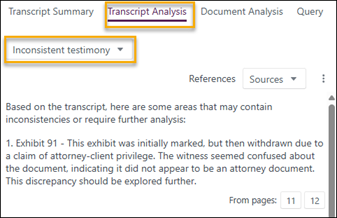
Sentiment Analysis
The Sentiment Analysis tool identifies strong emotions in the deponent's testimony. When a transcript is analysed, results are returned with an initial definition of what is understood by the term "sentiment analysis". The tool identifies strong emotions — such as fear, anger, and anxiety — in the witness's responses, and provides a list of responses that show strong emotions along with the topics or questions that elicited them.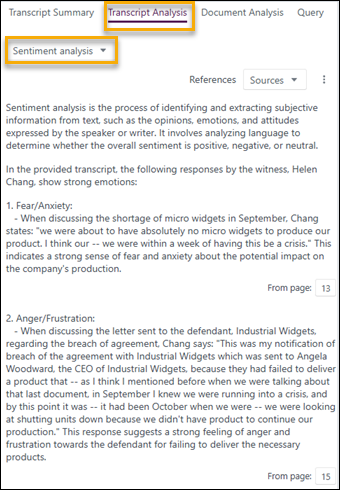
Lines of Inquiry
The Lines of Inquiry tool suggests questions that could be posed to witnesses to help clarify points they have made, with specific focus on areas where they may have been evasive or where their evidence could be incomplete or contradictory.
Results are returned as a numbered list with a description of the incomplete or contradictory testimony and suggested questions for the witness. Relevant page numbers are listed under each result.
Selecting a page number displays the references in a pop-out. Selecting a page number from the Transcript Viewer opens the transcript at that page with the relevant text highlighted.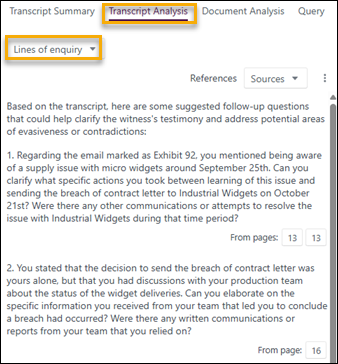
Related links
Related documentation
Opus 2 has help information accessible within the application; click the question mark and then select Documentation in the upper-right area of the platform. You can also access the documentation at: Opus 2 Support.
How to contact us
To contact us about the documentation, or if you have any other questions or issues about Opus 2 solutions, contact Opus 2 Platform Support by emailing Opus 2 Platform Support.