
| Minimum Software Version | 8.18.10 |
| Solution(s) | Hearings ⨉ Cases International ✓ Cases US ✓ Institutions ⨉ Counsel ✓ |
Worksheet configuration refers to the process of defining the structure and behavior of a worksheet before data can be added. Unlike a traditional spreadsheet, worksheets require predefined fields and settings to ensure consistent data entry and organization.
Configuration includes:
- Creating or modifying worksheet fields
- Setting rules and constraints for each field
- Defining relationships between fields (dependencies)
- Adjusting overall worksheet properties
Worksheet configuration can be applied when:
- Creating a new worksheet
- Updating an existing worksheet
Note: Creating new empty worksheets may be a premium feature depending on your user license.
Access Worksheet Configuration
Navigate to the desired worksheet
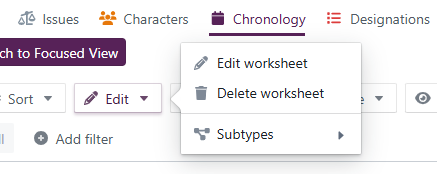
Click the Edit button in the worksheet menu
Select Edit worksheet
Create a New Worksheet (if permitted)
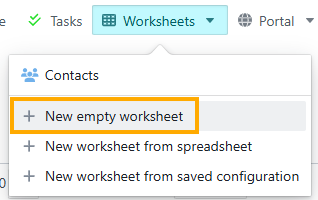
Open the Worksheets dropdown menu
Select + New empty worksheet
The worksheet configuration dialog will open for setup
Configure Worksheet Components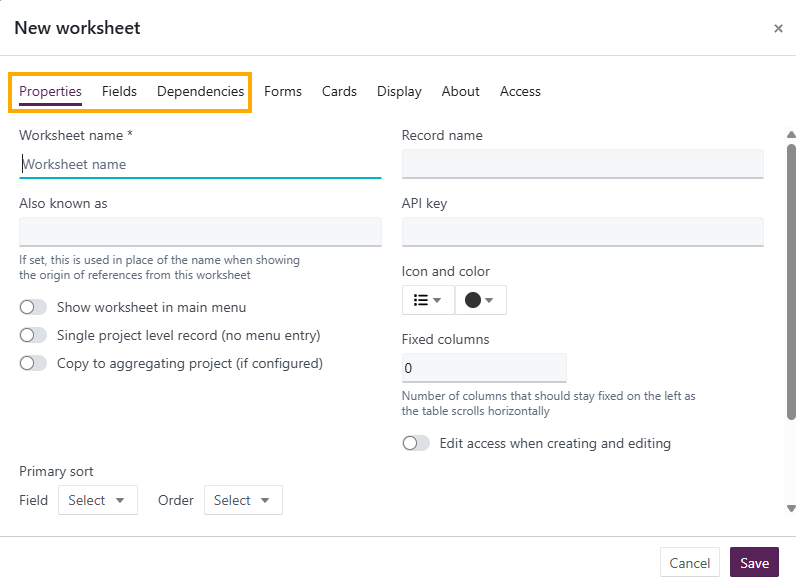
Worksheet configuration consists of three main areas:
1. Worksheet Properties
These define high-level settings for the worksheet.
Examples
- Worksheet name
- General behavior settings
- Display-related configurations
2. Worksheet Fields
Fields define the structure of the worksheet and determine what data can be captured.
Configuration Includes
- Selecting field types (e.g., text, date, choice)
- Setting required/optional fields
- Defining limits (character count, number range)
- Configuring choice options
3. Worksheet Dependencies
Dependencies define relationships between fields and control how they behave based on user input.
Example
- Selecting one option in a field may restrict available options in another field
- Ensuring logical consistency between related data points
Save Configuration
After completing configuration:
Review your settings
Click Save
The worksheet is now ready for use or updated with new configuration changes.