
| Minimum Software Version | 8.16.0 |
| Solution(s) | Hearings ⨉ Cases International ✓ Cases US ✓ Institutions ⨉ Counsel ✓ |
Explains the recommended order for adding entities from Single Document Analysis to worksheets to maximise efficiency when building a chronology.
When using Single Document Analysis, the order in which entities are added to worksheets affects efficiency. The recommended order is: Organisations (US), then Characters, then Events. This allows events added to the Chronology to link to existing entries rather than requiring them to be created retrospectively.
Why this order matters
By creating organisations first and then characters, you establish the main entities that events can later be linked to. When events are subsequently added to the Chronology, the relevant characters and organisations already exist and can be linked directly, making the process faster and more efficient.
Step 1: Run Single Document Analysis
- Select the document or transcript.
- Select the Analysis tab in the Details panel to run the analysis.
Step 2: Add organisations
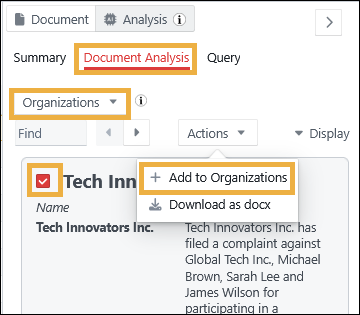
- Select the Document Analysis tab.
- Select Organisations from the dropdown.
- Select the organisations to be added to the worksheet.
- In the Actions dropdown, select + Add to Organisations.
Step 3: Add characters
- Select People from the dropdown.
- Select the people to be added to the worksheet.
- In the Actions dropdown, select + Add to Characters.
You can now link those characters to their associated organisations using the Characters worksheet.
Step 4: Add events
- Select Events from the dropdown.
- Select the events to be added to the worksheet.
- In the Actions dropdown, select + Add to Chronology.
You can now link those events to the associated characters and organisations using the Chronology worksheet.
Related links
Related documentation
Opus 2 has help information accessible within the application; click the question mark and then select Documentation in the upper-right area of the platform. You can also access the documentation at: Opus 2 Support.
How to contact us
To contact us about the documentation, or if you have any other questions or issues about Opus 2 solutions, contact Opus 2 Platform Support by emailing Opus 2 Platform Support.