
| Minimum Software Version | v9.30.0 |
| Solution(s) | Hearings ✓ Cases International ✓ Cases US ✓ Institutions ✓ Counsel⨉ |
Improvements released now
Institutions improvements
Expression updates now propagate reliably
Expression-driven fields in shared aggregating projects now update consistently when source figures change. Previously, updates could save locally but fail to propagate, leaving uncertainty about whether changes had taken effect.
Project template links are retained when editing settings
Projects remain linked to their templates after changes to project features are saved. Previously, saving these settings could break the template link and revert the configuration.
Document link icons are visible on first load
Link icons on the Documents page now appear immediately on first view. Previously, icons indicating worksheet references were only visible after editing a worksheet row.
Faster dashboard load for large workspaces
Project dashboards now load progressively, making workspaces with many projects usable within seconds. Previously, the dashboard waited for all projects to load before displaying.
Hearings improvements
Clear error messaging on failed login
Entering invalid credentials now displays a clear error message. Previously, this resulted in a server error without helpful guidance.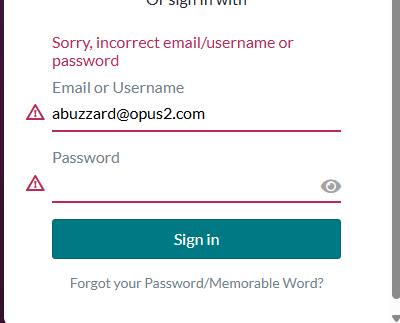
Cases improvements
Improved reliability for large exports
Export jobs now have increased memory, reducing failures for large bundles.
Upcoming features
Customisable Table of Contents for Bundles (collections)️ - Preview release
We are introducing a new Table of Contents editor designed to give you greater flexibility in creating court-compliant indexes across key jurisdictions. The updated experience will be more intuitive and easier to use, with real-time preview capabilities. You will be able to set up a table of contents with flexible formatting and layout options, including font type, font size, headings, and section headings, a choice of unified or section-level tables, and control over column layout and visibility.
Stamps - Preview release
Based on customer feedback, we are investing in a new, modernised Stamps experience to provide an improved way to create, manage, and export stamps. The new Stamps feature will introduce, among other things:
- A more flexible and intuitive stamp builder, enabling you to easily create and customise stamps with concatenated fields, and helping you to design consistent, tailored stamps.
- Real-time preview to make stamp setup clearer and more predictable.
- Consistent stamp application and removal across documents, collections, and proxy documents, including the ability to remove a specific stamp, not just “remove all”.
- Metadata fields remain supported (as in Legacy Stamps), with more focused styling controls to prioritise consistent output between the platform and exports.
Search
We're improving our Search functionality to deliver faster, more accurate, and more reliable results.
These updates seek to:
- Return results more quickly and with greater accuracy.
- Provide clearer, more consistent highlighting so results are easier to understand and trust.
- Enable us to detect and resolve issues earlier through improved monitoring.
AI for Hearings
Opus 2 is aiming to deliver real-time inconsistency checking on live transcriptions in multi-party hearings. In this setting, a workspace contains all the documents compiled by a case team, and the objective is to use this knowledge base to generate real-time insights from the live transcription.
Related documentation
Opus 2 has help information accessible from within the application; accessible by clicking the question mark and then selecting Documentation in the upper right area of the platform application. You can also access the documentation at: Opus 2 Support.
How to contact us
To contact us about the documentation, or if you have any other questions or issues about Opus 2 solutions, contact Opus 2 Platform Support by emailing Opus 2 Platform Support.