
| Minimum Software Version | 8.17.0 |
| Solution(s) | Hearings X Cases International ✓ Cases US ✓ Institutions ✓ Counsel ✓ |
Release types
- (GA) - The feature is Generally Available and visible in the product to users, depending on their role.
- (GA – config) - The feature is Generally Available, but templates and existing projects must be configured before it can be put to use.
- (GA – feature) - The feature is Generally Available, but only if switched on by an Opus 2 operator. Only some solutions are expected to use the feature. Commercial add-ons also come under this category and are only be enabled for clients who have purchased them.
- (GA – feature and config) – The feature is Generally Available but only if switched on by an Opus 2 operator. Only some solutions are expected to use the feature. Once switched on, it requires configuration of the template and existing projects before the feature can be used.
Improvements
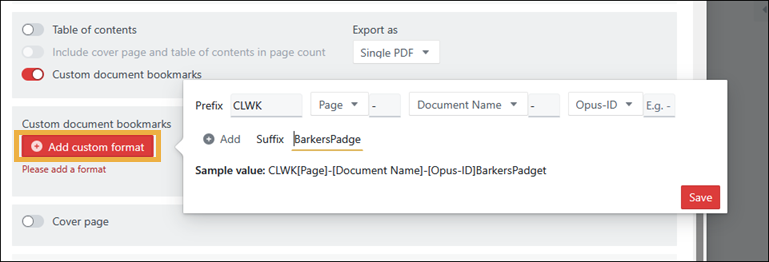
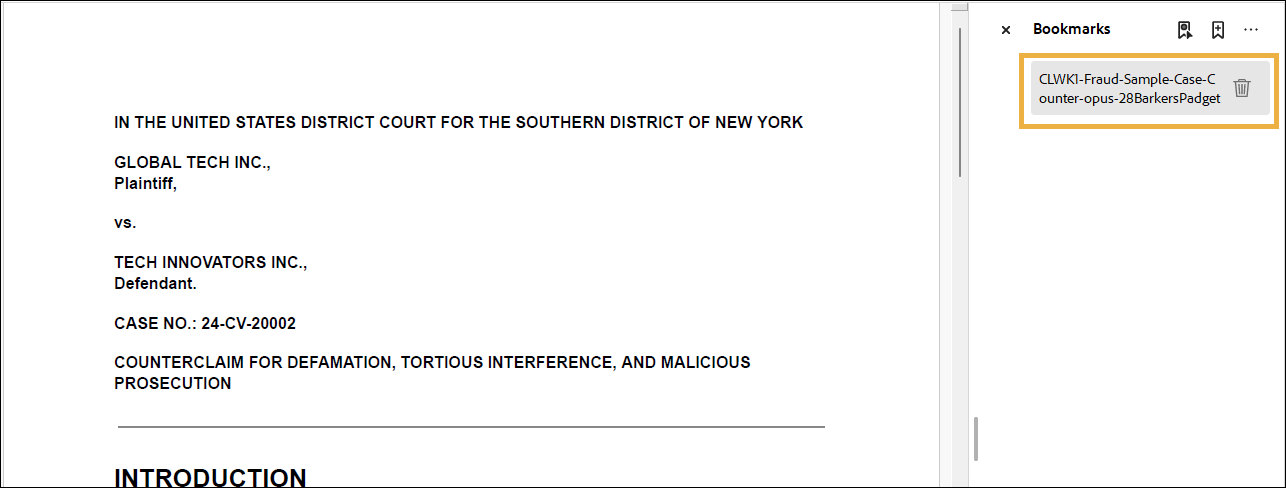
New export option for customising PDF bookmarks (GA)️
Previously when collections were exported and provided to courts as a bundle, law firms often need to add specific metadata to PDF bookmarks that can be used for navigation. This can be a court requirement, with the England and Wales Judiciary’s guidance stating “All significant documents and all sections in bundles must be bookmarked for ease of navigation, with a short description as the bookmark. The bookmark should contain the page number of the document.”
Previously, bookmarks had to be manually updated once the bundle was exported, which was time consuming and error prone.
Now a new export setting for Custom document bookmarks has been added to allow custom formatting of PDF bookmarks when exporting single PDFs.
Learn more: Export settings reference
New export option to rotate all landscape pages (GA)
Previously, when preparing a collection, clients had to rotate landscape pages to portrait orientation one document at a time. This was done so that the full bundle could be viewed in portrait when the exported collection was viewed electronically, for example in Adobe PDF.
A new Page rotation setting has been added to Export settings to allow landscape page rotation on export and the correct behaviour when combined with stamps. There are three options to choose from: No rotation, Rotate clockwise, Rotate counter clockwise.
 Learn more: Export settings reference
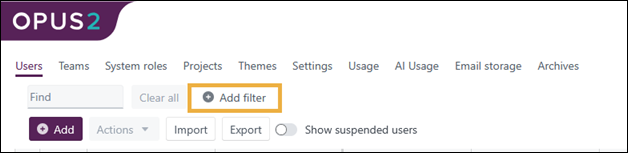
New filtering ability in System Administration screens (GA)️
If you are an Opus 2 System Administrator, you can now use multiple filters for specific columns to quickly and accurately locate users, projects, templates etc.
Archive zip export limit increased from 250 GB to 500 GB (GA)
When exporting zipped archives from the Opus 2 Platform, the limit for file size is now 500 Gb.
Learn more: Performance limits
Related documentation
Opus 2 has help information accessible from within the application; accessible by clicking the question mark and then selecting Documentation in the upper right area of the platform application. You can also access the documentation at: Opus 2 Support.
How to contact us
To contact us about the documentation, or if you have any other questions or issues about Opus 2 solutions, contact Opus 2 Platform Support by emailing Opus 2 Platform Support.
Related articles
List of fixed Customer Support issues